
Scanning is the core motion of retail arbitrage: point your phone at a barcode, and in seconds know whether the product is worth buying to resell on Amazon. Done well, you can walk a clearance aisle and turn a pile of random discounts into a short list of profitable buys. Here's exactly how in-store scanning works and how to do it efficiently.
How to scan products in-store, step by step
- Set your rules before you go. Pick a minimum cash profit, a target ROI and the demand you need (for example £3 a unit, 30% ROI and a steady BSR), so a tempting markdown can't change them in the aisle.
- Scan the product's own barcode. Use the EAN or UPC printed on the pack, not the shelf-edge label, which can belong to a different size or variant.
- Check the match. Compare the Amazon title, photos, pack count and variant with the item in your hand. A twin-pack listing and a single unit are different products.
- Read profit against the price you'll pay. Enter the real till price after any multibuy and compare it with the max buy price. If the price you'll pay is above it, skip.
- Check demand and competition. Look at the BSR history, how many sellers share the listing and whether Amazon itself sells on it.
- Check you can sell it. Some brands and categories are gated, so confirm eligibility for your own seller account.
- Decide and log it. Buy, save it as a maybe, or walk away, and note why. The log shows which checks actually saved you money.
What happens when you scan
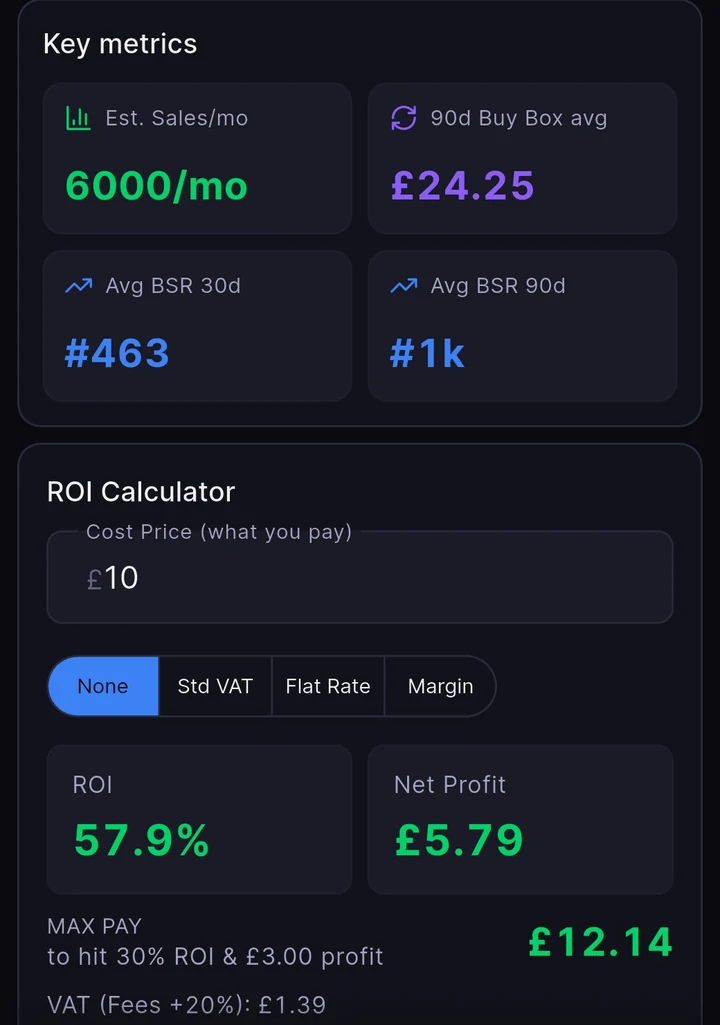
A scanner app reads the barcode and, in a second or two, shows you:
- The Amazon selling price for that product.
- The fees — referral fee and FBA fulfilment fee (see fees explained).
- Your net profit and ROI once you enter (or it estimates) your cost.
- The maximum you should pay to hit your target ROI.
- Demand — Best Sellers Rank and estimated sales (see BSR explained).
- Competition — how many sellers, and whether Amazon is on the listing.
That's the whole retail-arbitrage decision, from one scan.
How to read the numbers
For each scanned product, check four things fast:
- Profit and ROI — above your floor (many UK sellers use ~30% ROI and £3+ per unit; see benchmarks)?
- Max buy price — is the shelf price at or below the maximum that hits your target?
- Demand — does the BSR (and its history) show steady sales?
- Competition — is Amazon on the listing (hard Buy Box)? How many sellers share the sales?
Clear all four → buy. Fail one → skip. Most products fail, and that's the point.
Sourcing efficiently
The art of a good scanning session:
- Work the clearance and reduced aisles first — that's where the price gaps live.
- Scan fast and skip fast — don't agonise; the app gives you the verdict, trust your rules.
- Enter your real cost (the reduced price, after any multibuy) for accurate profit.
- Save the maybes — flag borderline products to a buy list or watchlist rather than deciding on the spot.
- Check eligibility on anything promising — some brands are gated.
Scanning where there's no signal
Big shops often have dead spots. A good scanner app queues scans offline and processes them when signal returns, so a basement clearance aisle doesn't stop you. That's a small feature that matters a lot in practice.
Do it with Axivelo
Axivelo is built for exactly this: scan a barcode and get net profit, ROI, your maximum buy price, and the demand and competition signals on one screen, with UK fees and VAT built in and an offline scan queue (Pro) for no-signal shops — plus a buy list and watchlist to track the maybes. Free to start on Android (10 scans/day free). Pair it with the free FBA calculator for desk checks, and if you're new, start with what retail arbitrage is and where to source stock in the UK. Still choosing an app? Our comparison of the best Amazon FBA scanner apps in the UK and the round-up of free scanner apps cover that choice; this guide is about the routine once you have one.
One scan, five decisions
Picture a discounted multipack priced at £11. A barcode match returns an Amazon page at £25, but before buying ask: (1) is it the same pack count and condition? (2) does my seller account have permission to offer that ASIN? (3) is £25 a durable selling price or a temporary high? (4) what are the referral, fulfilment, prep and VAT costs for this exact item? (5) how many competing offers and likely sales justify its storage time? A scanner supplies signals; it cannot guarantee a sale or permission to list. A mismatched pack means skip even if a screen flashes “profit”.
For eligibility, Amazon's Add Products guidance describes the approval message; its Seller app can scan a barcode and find the catalogue item. Check fees with Amazon's estimator using the exact ASIN. If your scanner queues scans without signal, review them again before checkout once online; an offline barcode alone cannot confirm today's price, gating or stock. Record which checked number made you buy or skip. That habit will reveal whether the tool actually improves decisions rather than merely making scanning faster.
Why a correct barcode still needs inspection
A scanner can find a catalogue entry for an EAN, but shop inventory may carry a new formulation, a different quantity, a language-specific pack or a damaged outer box. Compare the listing title, pack count, photos, expiry expectations and condition instructions to the physical product. If the listing is a twin pack and you have one unit, multiplying the perceived margin by two does not fix the mismatch. Scan the exact product again if there are multiple variants, and save a photo or note for later verification. Never describe an opened or damaged item as new merely because the barcode scans.
Rank and price history need context. A single low bestseller rank does not directly state units sold this month; it is relative to a category and can jump after a promotion. Keepa describes its historical price charts; compare multiple months, Amazon's own offer and the number of competing sellers. Decide on a minimum cash profit, target ROI and maximum buy price before a tempting markdown. If any key value is missing offline, queue the barcode and finish the decision online before paying.
Make a scan log you can audit
- Record the shop price including VAT, the date, exact barcode and the ASIN selected.
- Save the model's sale price, referral category, FBA size/weight and VAT assumptions.
- Mark Amazon listing eligibility as confirmed, restricted or unknown for your own seller account.
- Log the decision and the later outcome: bought, sold, repriced, returned or still in stock.
After twenty checks you can see which categories generate genuinely actionable finds and whether your margin threshold survives real fees. The goal is a repeatable decision process, not a record number of scans. Amazon's official fee estimator remains the final check when the deal is substantial or an app's output looks unusually generous.
Check any product before you buy
Axivelo scans a barcode in the shop and shows estimated Amazon UK profit, ROI and MAX PAY on one screen, so you can run this routine before you reach the till. 10 free Amazon UK scans a day on Android; iPhone users can join the waitlist.
FAQ
How do I scan a product to see if it's profitable on Amazon?
Use a scanner app to read the product's barcode. It matches the item to its Amazon listing and shows the selling price, fees, your net profit and ROI, the maximum you should pay, and demand and competition signals — so you can decide buy or skip in seconds.
Should I scan the shelf label or the product's barcode?
Scan the barcode printed on the product itself. A shelf-edge label can belong to a neighbouring size or variant, so it can match the wrong Amazon listing. If a pack carries more than one barcode, scan each and compare the listings before you decide.
How do I know how much to pay for a product when scanning?
Good scanner apps show a maximum buy price — the most you can pay and still hit your target ROI (for example 30%). If the shelf price is at or below that figure, the deal works; if it's above, skip. This removes the guesswork at the shelf.
Can I scan products in a shop with no signal?
Yes, if your app supports offline scanning. Axivelo Pro queues scans made without signal and processes them when your connection returns, so dead spots in large shops don't stop your sourcing session.

UK Amazon FBA sellers — we built Axivelo after one too many trips juggling Keepa, a calculator and a spreadsheet halfway down a B&M aisle. Now it shows profit, ROI, MAX PAY and demand on every in-store scan.