
AI Deal Analysis is the newest part of Axivelo Pro, and the one we’re most careful about. A written opinion on a deal is only useful if you know where it comes from and where it stops. This post explains what the feature does, what it looks at, how the monthly allowance works and, just as important, what it can’t do for you.
What AI Deal Analysis is
When you scan a product, Axivelo already shows the estimated profit, ROI, MAX PAY, demand and risk flags on the result screen. Those come from the app’s own maths and rules, with no AI involved. AI Deal Analysis is an optional extra on that screen for Pro users: press Analyse with AI and, a few seconds later, you get a written read of the listing.
Nothing is sent to an AI provider until you press the button, and the rest of the app works the same whether you use it or not. The answer always arrives in the same layout:
- Overall assessment: two or three sentences that pull the signals together.
- Key risks: the things most likely to cost you money on this listing.
- What to check next: the checks worth doing before you pay.
- Limitations: what the evidence couldn’t show.
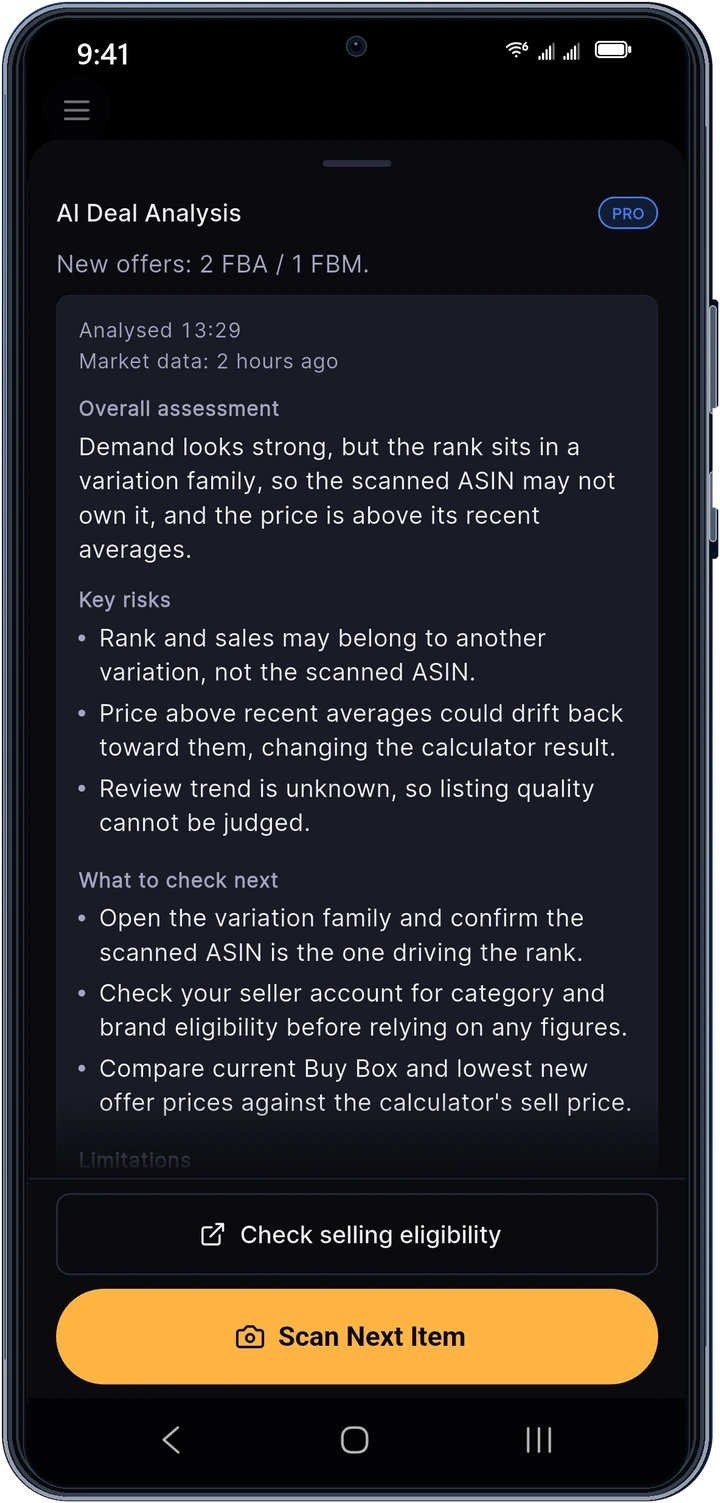
Tap Show full analysis for three more sections: demand and sales trends, competition and the Buy Box, and pricing and profitability context. Above the text, the card shows when the analysis was made and how old the market data is.
A real example
Here’s what it said about a book we scanned on 16 November 2026, before we’d entered a cost price. The overall assessment: demand looked healthy, but the price sat above both its recent averages and the app rated competition as avoid, so the current Buy Box price might not hold. It added that profitability couldn’t be judged without a cost.
The key risks it listed were the price falling back towards its averages, Amazon selling the same item and possibly taking the Buy Box, and heavy offer depth squeezing the price you could get. Its next steps were to enter the real cost to see profit at today’s price and at the averages, and to check that the seller account could list the book as new. Under Limitations, it noted that the review trend wasn’t available, so product feedback couldn’t be read from the evidence.
None of that is a verdict. It’s the scan’s numbers put into words, with the gaps named. You still decide.
What it looks at
The analysis only works from the evidence behind the result screen. Our privacy policy lists it in full. In short:
- The product: ASIN, brand, title, category, and whether you chose new or used.
- Demand: sales rank (BSR), its 30-day and 90-day averages, estimated monthly sales and the app’s demand rating.
- Competition: seller and offer counts, whether Amazon is on the listing, and Buy Box, stock and promotion signals.
- Prices: current and average prices, including the Buy Box price and the lowest seller price.
- Risk: the traffic-light result and the other risk flags the app shows, such as brand alerts and pack-size warnings.
- Your inputs: your cost price, a sell price if you typed one, your VAT mode and seller type, and the calculator’s fees, profit and ROI.
- Freshness: the date of the scan and how old the market data is.
Before you see the answer, our server checks it against that evidence and rejects answers that fail the checks. That catches many mistakes, but not all of them.
What it can’t do
These limits matter as much as the features:
- It doesn’t tell you what to buy. It describes demand, competition, pricing and risk. The decision, and the money, stay yours.
- It can be wrong. The text is written by an AI model. Even with our server’s checks, an analysis may be inaccurate, incomplete or out of date, so don’t make it the only basis for buying, selling or listing a product.
- It can’t see your seller account. Whether you can sell a product depends on your own account, so check selling eligibility in Seller Central or the Amazon Seller app. Our guide to gated items on Amazon UK explains why.
- It can only judge what it’s given. With no cost price there’s no profit judgement, and a missing review trend or thin price history appears under Limitations rather than being guessed.
- It isn’t financial advice. Like everything in Axivelo, it’s information to help you decide, not financial, tax or business advice. The card says so in its footer.
- It isn’t Amazon’s fee quote. Fees and profit come from the app’s estimate. For a high-value buy, check the exact ASIN in Amazon’s Revenue Calculator too.
100 analyses a month: how the allowance works
Each Pro account can generate up to 100 new analyses per calendar month, UK time. The allowance resets at midnight UK time on the 1st, and unused analyses don’t carry over. The count sits under the button, for example “82 of 100 analyses left this month · resets 1 Dec”.
Asking again for the same product with the same figures within 24 hours shows the stored analysis and doesn’t use the allowance. A new cost price, or market data that has moved, makes it a new analysis.
The feature can also be paused or limited: during maintenance or an outage at the AI provider, to stop abuse, or if our monthly spending limit for the feature is reached. Scanning and the profit maths keep working when it is.
Is 100 enough? It works out at about three a day, and you won’t need a written analysis for every scan. Most items fail on the numbers in seconds. Save it for the shortlist: products where profit and ROI look right and you want a second read of the risk before you pay.
What happens to your data
When you press the button, the app sends the product details on the result screen and your calculator figures to our server in London. Our server turns them into a short evidence summary and sends that to Anthropic, which provides the Claude model we use, through Anthropic’s commercial API.
We don’t send Anthropic your name, email address, account or device identifiers, payment details, notes, scan history, Watchlist or Buy List, and the request comes from our server, not your phone. Under its commercial terms, Anthropic may not use the data to train its models. We keep a generated analysis on our servers for 24 hours so a repeat request doesn’t use your allowance. After that it’s no longer shown and is deleted automatically, usually within another day. The full detail, including Anthropic’s own retention periods, is in section 4.5 of our privacy policy, and the rules for the feature are in section 6 of our Terms.
How to get the most from it
- Scan the barcode and read the result: estimated profit, ROI, MAX PAY and the risk flags.
- Enter your real cost. Without it, the analysis can’t judge profit.
- If the numbers pass your own rules, press Analyse with AI.
- Read Key risks and What to check next first. They’re the parts most likely to change your mind.
- Check selling eligibility on your own account, then decide.
If you’d rather read the history yourself, our guides to reading Keepa graphs, how the Buy Box works and a good ROI and BSR for Amazon FBA cover the same signals the analysis reads.
Don’t see the button?
AI Deal Analysis needs Axivelo Pro and a current version of the app, so update it from Google Play first. Older versions show an automatic “AI Deal Summary” card to Pro users instead. Since 14 November 2026 our server has written that summary from fixed rules rather than an AI model, so it isn’t the same thing, even where an older version still labels it AI.
Scan first, then ask for a second read
Axivelo shows estimated Amazon UK profit, ROI and MAX PAY from a barcode scan, free for 10 scans a day on Android. Pro adds AI Deal Analysis, up to 100 a month.
FAQ
How many AI Deal Analyses do I get with Axivelo Pro?
Up to 100 new analyses per calendar month, UK time. The allowance resets at midnight UK time on the 1st, unused analyses don’t carry over, and the app shows how many you have left under the Analyse with AI button.
Does opening the same analysis again use the allowance?
Not if it’s the same product with unchanged figures within 24 hours: the app shows the stored analysis instead. A new cost price or updated market data counts as a new analysis.
Is AI Deal Analysis on the free plan?
No. The free plan gives 10 Amazon UK scans a day with the full profit maths, but AI Deal Analysis is part of Axivelo Pro, which costs £9.99 a month or £79.99 a year.
Does AI Deal Analysis tell me whether to buy?
No. It describes demand, competition, pricing and risk from the scan’s evidence and names what it couldn’t judge. It can be wrong and it isn’t financial advice, so treat it as one input and make the decision yourself.
Which AI model does Axivelo use?
Anthropic’s Claude, currently Claude Sonnet 5.5, through Anthropic’s commercial API. Our server sends it an evidence summary with no name, email address or account identifier. Section 4.5 of our privacy policy has the details.
Can it tell me if a product is gated for my account?
No. It can’t see your seller account, so it can’t know which products you’re allowed to sell. Check the exact product in Seller Central or the Amazon Seller app before you buy.

UK Amazon FBA sellers — we built Axivelo after one too many trips juggling Keepa, a calculator and a spreadsheet halfway down a B&M aisle. Now it shows profit, ROI, MAX PAY and demand on every in-store scan.